Bo0mB0om
Senior

Joined: 05 Mar 2016
Posts: 15046
|
 Posted: 23/07/2021 08:44 Post subject: FotoWorks XL 2021 v21.0.2 DC 15.07.2021 Multilingual Posted: 23/07/2021 08:44 Post subject: FotoWorks XL 2021 v21.0.2 DC 15.07.2021 Multilingual |
 |
|
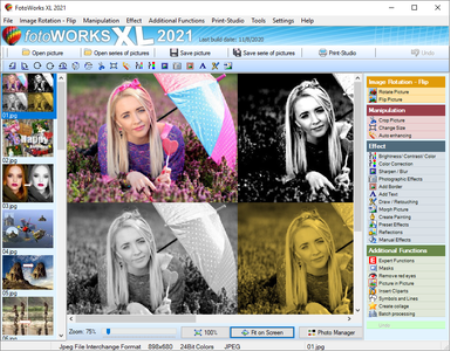
FotoWorks XL 2021 v21.0.2 DC 15.07.2021 Multilingual | 75 Mb
FotoWorks XL is easy photo editing software for bners, photographers or professional users.
Is not easy but FotoWorks XL delivers whether you are a professional photographer or an amateur who just needs a bit of help retouching your snaps. A simple photo editing software suite, FotoWorks XL has been updated and improved from previous versions. Anyone who is new to it will find that it is a feature-rich package. It allows you to do just about everything you could ever want to with photographs, graphics, clip art and text.
Although it is very much photo editing software for bners, the number and complexity of the package's more advanced functions means that it is equally of use to graphic designers, photojournalists, portrait photographers and wedding photographers. Like all top photo editing software suites, this package has something for everyone.
Photo Editing Software
Use it to perform simple functions like removing red eye from holiday snaps or to touch up images in preparation for a print run. In fact, the latest version of this updated photo editing software will allow you to perform histogram analysis of your pictures. This can be done for the whole of the photograph in question or just part of it - it is up to you. See graphical representations of the hue, the greyscale or the mix of red, blue and green to help you make your pictures more balanced. You can also use it as a print station by getting it to enlarge your images so they can be turned into posters, reports, or even sales catalogues. Few photo editing software suites you might categorize with the degree of professional design that FotoWorks XL come with a free trial period either!
Ideal for schools, colleges and individuals who want to learn more about digital editing techniques, FotoWorks XL is a photo editing suite that is also right at home in the workplace. It is used by editors, professional photographers and graphic designers of all kinds to realizează truly memorable images. The suite offers so much more than a basic photo editing software package that merely allows you to crop and rotate your pictures. With FotoWorks XL, you have a truly creative set of digital tools at your disposal that will improve your post-production editing skills no end. The sky is the limit when you start to use it in ever more creative ways!
Choose a Photo Editing Software Package That Is Designed to Be Easy to Operate
FotoWorks XL is easy photo editing software for PC users will be right at home with because it has been designed to integrate seamlessly into the Windows operating system. Designed as photo editing software Windows 10 users can get on with immediately, FotoWorks XL is all about its ease of use. In fact, it is not just photo editing software Windows 10 operators can use. FotoWorks is also backwards compatible. So, it works just fine as photo editing software Windows 7 users can enjoy. Indeed, the whole program operates in very much the same way as other packages designed for Microsoft operating systems.
Discover More About the Features Offered With This Photo Editor Suite
Thanks to its numerous photo editing tools, FotoWorks XL photo editor may be the only photo editing software you will ever need.
Photo editing software as advanced as FotoWorks XL rarely comes with so many different features to make use of. However, the updated version of this useful photo editing software package has only added to the things you can do.
- Enhance and improve photos.
- Retouch and edit photos.
- Produse photo montage.
- Use auto-enhancing photographic measures.
- Alter the size of images.
- Alter the brightness, color and contrast of photos.
- Use color correction techniques.
- Sharpen and blur photos.
- Add photographic filters.
- Add borders and text.
- Draw on your photos by hand.
- Retouch images.
- Use morphing techniques.
- Create painting effects.
- Add reflections.
- Apply effects manually and automatically.
- Făcute collages.
- Remove red eye.
- Insert clip art.
- Add pictures within pictures.
- Crop images.
- Add symbols and lines to your photos.
Windows 10, Windows 7, Windows 8, Windows 8.1, Windows Vista
DOWNLOAD
(Buy premium account for maximum speed and resuming ability)
| Code: |
https://nitroflare.com/view/F39D30E856A76C3/ilba2.FotoWorks.XL.2021.v21.0.2.DC.15.07.2021.Multilingual.rar
|
| Code: |
https://rapidgator.net/file/8358812d67c20b1a45083839a3ae95fe/ilba2.FotoWorks.XL.2021.v21.0.2.DC.15.07.2021.Multilingual.rar
|
|
|






