Bo0mB0om
Senior

Joined: 05 Mar 2016
Posts: 15046
|
 Posted: 15/07/2021 10:32 Post subject: SmartSystemMenu 2.6.2 Posted: 15/07/2021 10:32 Post subject: SmartSystemMenu 2.6.2 |
 |
|
File Size : 0.8 Mb
This little utility will help make working with numeroase windows a more efficient process with more than enough useful functions to streamline your work. It can be attached to the title bar menu keeping it in easy reach. The fact that it is portable is just another bonus as you can quickly load it on a flash drive for use on any machine you may be using.
Once launched, SamrtSystemMenu appears down in the systray. But the icon placed there has no real function other than letting you know it is active, auto-starting the app or to entirely exit. The power is contained within the right-click context menu. From there you can view the General information tab for a target window including the handle, caption, class, style, and rectangle size. You can also access the process tab which provides the module name and path, the ID of the thread and the associated process.
SmartSystemMenu will be a substantial augmentation to the default Windows settings with the added ability for help with window management functions that are usually not so easy to access and therefore often are overlooked - SmartSytemMenu puts them out front and easily accessible allowing for straightforward use.
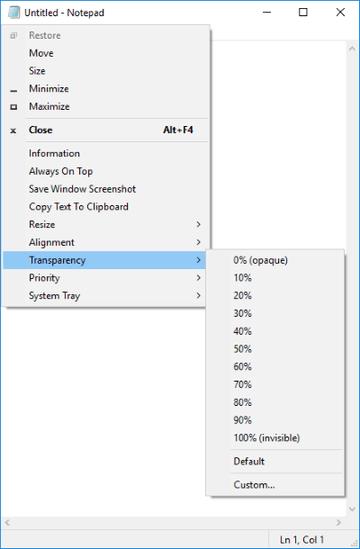
It appends the following custom items to the menu:
-Information: Shows a dialog with information of the current window and process: the window handle, the window caption, the window style, the window class, the process name, the process id, the path to the process
-Always On Top: Allows the current window to stay on top of all other windows
-Save Window Screenshot: Allows saving the current window screenshot on a disk
-Resize: Allows changing the size of the current window
-Alignment: Allows the current window to be aligned with any of the nine positions on the desktop
-Transparency: Allows changing the transparency of the current window
-Priority: Allows changing the current window's program priority
-System Tray: Allows minimizing the current window to the system tray
If your OS has enabled UAC, the system will display a UAC dialog. You do not need to worry because the program needs elevated privileges. After the program has been executed, in all system menus of all windows you can see custom items.
DOWNLOAD
(Buy de lux account for maximum speed and resuming ability)
| Code: |
https://nitroflare.com/view/FBEF63EDE94AA93/a2xvs.SmartSystemMenu.2.6.2.zip
|
| Code: |
https://rapidgator.net/file/dc2e29d491384adf956e95fde59a9aa4/a2xvs.SmartSystemMenu.2.6.2.zip
|
|
|






