Bo0mB0om
Senior

Joined: 05 Mar 2016
Posts: 15046
|
 Posted: 14/07/2021 15:46 Post subject: Ultra Fractal v6.04 (x86/x64) Extended Edition Posted: 14/07/2021 15:46 Post subject: Ultra Fractal v6.04 (x86/x64) Extended Edition |
 |
|
Ultra Fractal v6.04 (x86/x64) Extended Edition
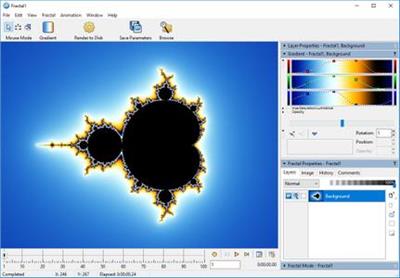
Ultra Fractal v6.04 (x86/x64) Extended Edition | 32 MB Language: English
Ultra Fractal 6 is a great way to create your own fractal art. fractals are much more than the Mandelbrot sets that you may have seen before. With Ultra Fractal, you can choose from thousands of fractal types and coloring algorithms, zoom in as far as you want, use gradients to add color, and apply numeroase layers to combine different fractals in one image. Ultra Fractal is very easy to use and yet more capable than any other fractal program. No mathematics required!
Get started quickly with the integrated tutorials
It is easy and fun to start using Ultra Fractal with the built-in tutorials. Starting with the basics, you will soon learn how to create your own fractals, change the colors, add layers, use masks, and even create animations. You can also download the PDF manual to print the tutorials.
Explore thousands of fractal types and coloring options
First explore the standard fractal types in Ultra Fractal to get familiar with them. Then connect to the online formula database to download thousands of additional fractal formulas and coloring algorithms contributed by other users.
Formulas can also use plug-ins which lets you easily mix and match features. By combining different plug-ins, the possibilities truly become endless. For more information, see Plug-ins in the Ultra Fractal help file.
Finding the best formulas and classes is made easy by the formula rating system.
Enjoy ultra-fast deep zooming
You can zoom to virtually unlimited depths with Ultra Fractal. Deep zooming is fully integrated and works with all fractal types and coloring options, even those you have written yourself. And thanks to the new perturbation calculations algorithm in Ultra Fractal 6, images that previously took hours or days to generate are now completed within minutes!
Use the classic selection box shown above, or zoom with the mouse by Shift-dragging or double-clicking inside the fractal window. Panning, rotating, stretching, and skewing are also possible, of course.
Tweak parameters with the versatile Explore feature
Choosing parameter values is a breeze with the new Explore feature. Experiment with new parameter values by moving the mouse cursor over a coordinate grid in the Explore window, while the Fractal Mode tool window shows a real-time preview of the result.
Explore works with integer, floating-point, and complex parameters.
Color your fractals and add transparency effects
Coloring your fractals is easy with Ultra Fractal's gradient editor. Drag the gradient curves up and down to create smooth ranges of colors, or use the Randomize options to quickly try various color combinations. You can also use the gradient editor to add transparency effects.
Windows requirements:
Ultra Fractal 6 is designed to run on any computer with Windows 10, 8, 7, Vista or XP, but it works best with Windows 10. The new High DPI support requires Windows 10 or Windows 8.1.
Ultra Fractal will run on any CPU that works with Windows, but Intel Core i7 or i5 processors are recommended for best performance. Ultra Fractal will seamlessly take advantage of multi-core and multi-processor systems.
The OpenGL graphics acceleration in Ultra Fractal 6 works with almost any graphics card. If the card is not supported, OpenGL acceleration is turned off automatically.
A monitor resolution of at least 1920 x 1200 pixels (HD) is recommended to work comfortably. High DPI (4K/5K) monitors are highly recommended to take advantage of the high resolution support in Ultra Fractal 6. This lets you view your fractals in almost print-like resolution on the screen.
On 64-bit systems, 4 GB of memory (RAM) is recommended; 2 GB on 32-bit systems and 1 GB for Windows XP. More memory will enable you to lucrate larger fractals with more layers. If you want to create large flame fractals, or if you want to render large images or animations with motion blur, more memory is always better.
Installing Ultra Fractal on your hard disk takes less than 20 MB, but you will want to reserve extra space to store fractals and rendered images. When rendering animations, you need enough free disk space for temporary data, depending on the length and size of the animation.
Home Page -
https://www.ultrafractal.com/
DOWNLOAD
(Buy de lux account for maximum speed and resuming ability)
| Code: |
https://nitroflare.com/view/69DFFCF15F669F9/jp583.Ultra.Fractal.v6.04.x86x64.Extended.Edition.rar
|
| Code: |
https://rapidgator.net/file/610599c76600983fd5e696c3251d9d84/jp583.Ultra.Fractal.v6.04.x86x64.Extended.Edition.rar
|
|
|






