rai10
Membru 3

Joined: 11 Mar 2016
Posts: 539
|
 Posted: 07/09/2022 12:30 Post subject: Windows 11 Pro Ultralight Serenity 22H2 Build 22621.590 Beta Posted: 07/09/2022 12:30 Post subject: Windows 11 Pro Ultralight Serenity 22H2 Build 22621.590 Beta |
 |
|
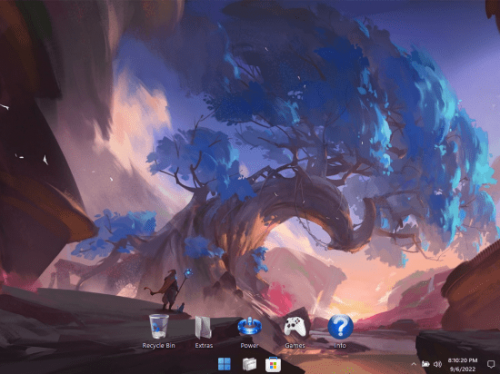
Windows 11 Pro Ultralight Serenity 22H2 Build 22621.590 BetaChannel x64 English PreActivated
Size: 1.5 GB Type: Apps OS Year: 2022 Version: 22621.590
The best Ultralight build of Windows FBConan (the author of Phoenix edition) ever made or used! This build integrates the latest cutting edge features including the newly refreshed UWP Apps, and File Explorer Tabs, which I have painstakingly enabled. If you don't care about those Features, and are looking for the most streamlined version of Windows 11 22H2 available, that still supports all 3rd party software, MS Store, Xbox, UWP, and features like Printing, Bluetooth, WLAN, Touchscreen, Language Packs, is designed to be as efficient, stable, small, and powerful as possible, and designed to stay that way, this is the build for you! If you care about Cumulative Updates, Defender, Backup and Restore, Diagnostics, Troubleshooting, Optional Windows Features (like Hyper-V, WSL, WSA), Windows Mail, or OneDrive, This Build is not for you.
Removed Features
- Cortana, Edge, BitLocker, WSL, Hyper-V, One Drive, Smart Card, Smart Screen, Defender, Security Center, Windows Mail, Backup and Restore, Diagnostics, Troubleshooting, Maps, Optional Features, Some Fonts, Some UWP Apps.
Disabled Features
- Windows Update Service, Error Reporting, UAC, Ads, Telemetry, Virtual Memory, Hibernation, Power Throttling, Automatic Maintenance and Download Blocking.
Performance Prioritized
- This build has been designed to Maximize Performance, Responsiveness, and Resource Savings.
Enabled Features
- DirectPlay
- .NET Framework 3.5
- File Explorer Tabs
- SMB1
Additions
- Custom Taskbar
- Custom Start Menu
- Custom Desktop Icons
- Custom Recycle Bin Icons
- File Explorer Tabs Enabler / Disabler
- Custom Performance Settings
- Custom Power Settings
- Custom Ease of Access Settings
- Custom Service Settings
- Custom System Settings
- Custom Registry
- Classic Games
- Selective System Transparency
- Additional Wallpapers
- Custom Themes
- Virtual Memory Enabler
- Web Browser Installers
- Tinywall Firewall
- Everything Search Engine
- WinAeroTweaker
- Custom Tools Menu
Installation
• Use Rufus ONLY to write the ISO to a USB Drive.
• Boot from the USB Drive, and Perform a Clean Installation to your desired partition.
• *Your PC Will Reboot Once, Shortly After Installation Completes.
How to Change System Language
• Enable Metered Connection First Before Proceeding! (VERY IMPORTANT!).
• You got Metered Connection Turned On? Good! Just Dublu Checking!
• Go to Start Menu ➞ Tools ➞ and click the 'Windows Update Service On' Shortcut.
• Go to Settings App ➞ Time & Language ➞ Language & Region.
• Click the 'Add a language' Button.
• Choose a language to install from the list, Then Click 'Next'.
• If Font Characters are Missing in the Language List, Install the Fonts Linked in the 'Recommendations' Section of this Thread.
Other Tips
• The Print Spooler Service, and Windows Update Service are DISABLED By Default.
• In the Start Menu ➞ Tools Folder, you can easily turn them On, or Off.
• To Install Printer Drivers, and Print, You must turn ON the Print Spooler Service.
• To Use the MS Store, Install Additional Languages, Use Xbox App, and Allow Windows to download drivers, you must turn ON the Windows Update Service.
• I've included a new Feature in this build! in the Start Menu - Tools Folder, you can turn ON or OFF File Explorer Tabs! - They are still in development, and may cause issues such as explorer crashing, if you want to turn them on or off, now you can EASILY do it! Restart is required after running the shortcut to complete changes.
• System Transparency is disabled By Default. To Enable it, go to Task Manager - Startup Tab - and change 'clear.exe' from Disabled, to Enabled, and Sign Out!

| Code: | https://rapidgator.net/file/2fc03cdcbe4d52c92c5cc847b42fb81c/11_Ultralight_22621.590_vis87.part1.rar.html
https://rapidgator.net/file/f31446d7a65c3253fad9aa0e27359a6a/11_Ultralight_22621.590_vis87.part2.rar.html |
|
|






